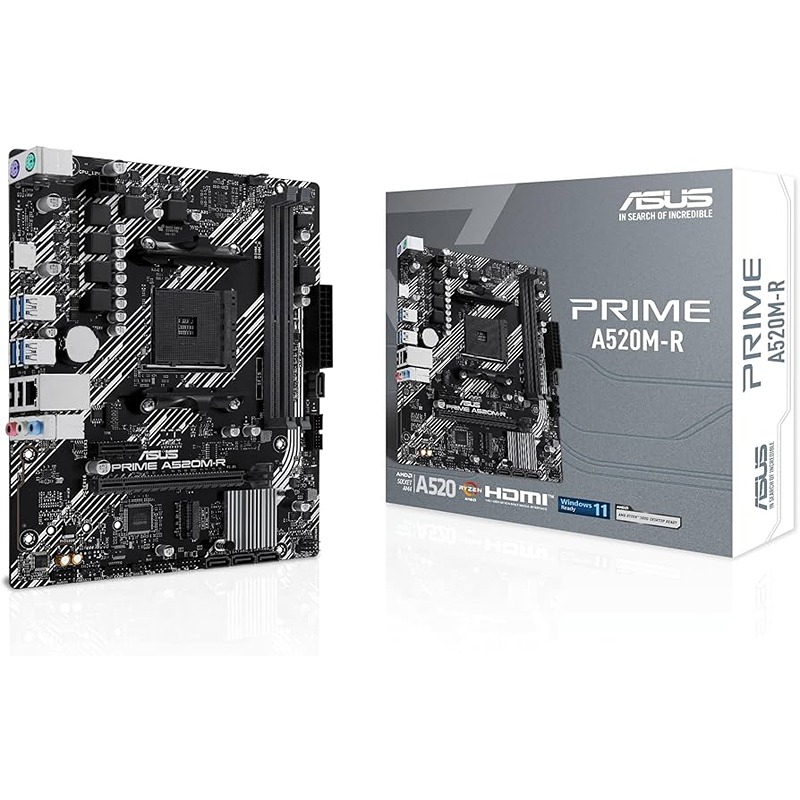
ASUS PRIME A520M-R AM4 Micro ATX DDR4 Gaming Motherboard M.2 HDMI USB 5Gbps
$ 98.77
The ASUS Prime A520M-R is a compact micro-ATX motherboard built for modern AMD Ryzen PCs. It features an AM4 socket that “is ready for AMD Ryzen™ 5000 Series/5000 G-Series/4000 G-Series/3000 Series/3000 G-Series Desktop Processors”. This means you can install current and previous-gen Ryzen CPUs up to the flagship 5000 series. For memory, it has 2× DDR4 slots up to 64 GB, supporting high-speed RAM up to DDR4-5100 MHz (OC). Dual-channel DDR4 3200 MHz (and above via overclocking) ensures smooth multitasking and gaming. Storage and connectivity are well-covered: the board includes one M.2 Key M slot (PCIe 3.0×4 / SATA) and 4× SATA 6 Gb/s ports. This lets you install a fast NVMe SSD for your OS or games (up to 32 Gbps PCIe 3.0 speeds) and additional SATA SSDs/HDDs for bulk storage. For graphics, there is a single HDMI 2.1 port capable of 4K at 60 Hz. Expansion slots include one full-length PCIe 3.0 x16 slot (driven by the CPU) and one PCIe 3.0 x1 slot – sufficient for a mid-range graphics card plus another card (e.g. a network adapter or audio card). Note that the A520 chipset limits PCIe to gen3 speeds (no PCIe 4.0 support). Onboard networking is handled by a Realtek 1 Gb Ethernet port (with ASUS LANGuard shielding for reliability), ideal for lag-free online gaming. Audio uses a Realtek 7.1-channel HD codec with high-quality capacitors for clear surround sound. The rear I/O panel provides 4× USB 3.2 Gen1 (5 Gbps) Type-A ports, 2× USB 2.0 ports, HDMI, 1 Gb LAN and 3× analog audio jacks, plus legacy PS/2 ports for older keyboards/mice. There’s also an internal front-panel USB 3.2 Gen1 header (for 2 more USB3 ports) and two USB 2.0 headers, letting you add front-case USB ports. A major selling point is ASUS’s 5X Protection III hardware safeguards. This includes DIGI VRM for stable power delivery, Overvoltage Protection, stainless-steel back I/O shielding, SafeSlot Core reinforcement for the PCIe slot, and LANGuard networking protection. These features ensure system stability and durability even under heavy loads or voltage spikes. The board also includes an aluminum PCH heatsink and is fully compatible with ASUS Fan Xpert (cooling control) for optimal cooling. In real-world use, the Prime A520M-R delivers the essential performance for 1080p and 1440p gaming builds, everyday productivity, and multimedia. Its micro-ATX size makes it great for space-saving builds, while still offering plentiful features for most users. Unlike higher-end B550/B650 chipsets, the A520M-R does not offer PCIe 4.0 lanes or built-in Wi-Fi, but its price point is much more affordable. For most Bahrain gamers building a value PC, this board provides “ultra-fast connectivity” with M.2 and plenty of USB ports and HDMI output, backed by ASUS software like Armoury Crate for easy updates. Performance is boosted by its support for fast RAM (via DOCP/XMP) and NVMe storage, meaning faster game loading and smoother multitasking. Compared to older A320 boards, the Prime A520M-R supports newer Ryzen chips and higher memory speeds, making it a solid upgrade path for budget builds. Why Buy ASUS Prime A520M-R in Bahrain? Buying locally gives Bahraini gamers and builders clear benefits. Games Gravity is a Bahrain-based store (Shop 30, Building 84, Gulf Commercial Complex, Samaheej/Galali) which means local trust and support. We price in BHD and offer transparent GCC warranty – ASUS motherboards include a 3-year limited warranty in this region. This means if any issue arises, you can rely on local service centers without costly imports. Our Bahrain customers expect fast delivery, and we deliver: orders are typically shipped in 1–2 business days, with same-day service available around Samaheej for urgent orders. You can track your order online or arrange local pickup from our Samaheej store. We even accept WhatsApp orders ( 973 3538 3410) for quick response. All product prices include Bahraini VAT and are charged in BHD (no currency conversion hassle). Shopping at Games Gravity also means you get local customer convenience: Cash-on-delivery is available, and our 7-day return policy and expert tech support ensure peace of mind. In Bahrain’s hot climate, our builds emphasize cooling – the Prime A520M-R’s integrated heatsink and fan headers (CPU and chassis fans) help keep components cool under heavy loads. We stock genuine ASUS products, so you avoid warranty gray-market issues. In short, buying this ASUS motherboard from our store gives you competitive pricing, local warranty support, Arabic/English service, and the confidence of quick Bahraini delivery. Expert Usage Tips Install Your CPU First: Always seat the AM4 CPU (e.g. a Ryzen 5 5600X) carefully and apply thermal paste before mounting the cooler. Check ASUS’s CPU support list to confirm Ryzen 5000/4000/3000 compatibility. Update the BIOS (via EZ Flash 3 or Armoury Crate) if using a newer CPU. Populate RAM Correctly: Use matched DDR4 modules in both slots for dual-channel performance. The board supports XMP/DOCP profiles – enable these in BIOS to run rated speeds up to DDR4-5100MHz. For stability, a 3200MHz or 3600MHz kit is a sweet spot for Ryzen. Optimize Storage: Insert your M.2 NVMe SSD into the M.2 slot (Key M, underneath the heatsink) to gain fastest boot and load times. Connect SATA drives to the blue SATA ports. In BIOS, ensure SATA/NVMe modes are set correctly (AHCI/RAID) if you’re using RAID arrays or just single drives. Front Panel USB & Case Connections: Utilize the onboard USB headers to add front-panel ports. The A520M-R has one USB 3.2 Gen1 header (for two 5Gbps ports) and two USB 2.0 headers. Also connect the front-panel HD audio and system panel headers (power/reset LEDs) correctly. Double-check our Quick Start Guide for pinouts. Cooling & Power: Attach your CPU fan to the dedicated CPU_FAN header and at least one case fan to the CHASSIS_FAN header. Use the aluminum PCH heatsink and any extra chassis fans to handle Bahrain’s heat. For power, plug the 24-pin ATX and 4-pin 12V connectors firmly. Enable “Fan Xpert” in Armoury Crate to fine-tune fan curves. Maintenance: Keep BIOS and drivers up to date with ASUS’s AI Suite 3 and updates via Armoury Crate. Every few months, clean dust out of the motherboard and connectors, and re-tighten screws. The board’s SafeSlot Core PCIe slot and quality caps mean it tolerates heavy GPUs, but avoid bending cards. Best Uses: This board excels in budget to mid-range gaming rigs. Pair it with a discrete GPU (GeForce GTX/RTX or AMD Radeon) for eSports/AAA games. It also works for home office PCs or light content creation. Although it lacks Wi-Fi, you can add a USB or PCIe wireless adapter if needed. In short, use it whenever you need reliable Ryzen performance with plenty of I/O and local Bahraini support. Technical Specifications Specification Details CPU Socket AMD AM4 – Supports Ryzen 5000/5000G/4000G/3000/3000G series Chipset AMD A520 Memory 2×DDR4 DIMM slots, max. 64 GB (dual-channel); supports DDR4 5100(OC)/3200/2933/2666/2400/2133 MHz Graphics Output 1×HDMI 2.1 port (supports up to 4K @ 60 Hz) Expansion Slots 1×PCIe 3.0 x16 (runs x16); 1×PCIe 3.0 x1 Storage 1×M.2 Key M slot (2242/60/80, PCIe 3.0 x4/SATA); 4×SATA 6 Gb/s ports LAN Realtek 1× Gigabit Ethernet (LAN) port (with ASUS LANGuard) Audio Realtek 7.1-channel HD Audio CODEC (up to 24-bit/192 kHz); 3×3.5 mm jacks (rear) USB (Rear I/O) 4×USB 3.2 Gen1 (Type-A, 5 Gbps); 2×USB 2.0 USB (Onboard) 1×USB 3.2 Gen1 header (supports 2 ports); 2×USB 2.0 headers Back Panel I/O 4×USB 3.2 Gen1, 2×USB 2.0; 1×HDMI 2.1; 1×Realtek 1 Gb LAN; 3×Audio jacks; 1×PS/2 (keyboard), 1×PS/2 (mouse) Special Features ASUS 5X Protection III (DIGI VRM, LANGuard, Overvoltage Protection, SafeSlot, stainless back I/O); ASUS Q-Design (Q-DIMM, Q-LED, Q-Slot); Aluminum PCH heatsink Form Factor micro-ATX (9.3″ × 7.6″ / 23.6 × 19.3 cm) FAQ: Q: How much does the ASUS Prime A520M-R cost in Bahrain? A: This motherboard is priced at roughly BHD 35-50 in Bahrain. For example, Games Gravity lists it at BHD 34.999. Actual prices may vary slightly by retailer or promotions. Q: Which CPUs are compatible with the ASUS Prime A520M-R? A: It uses an AM4 socket, supporting the full range of AMD Ryzen 5000, 5000G, 4000G, 3000, and 3000G series desktop processors. Always check ASUS’s CPU support list if using a very new or uncommon Ryzen chip. Q: What memory speed and capacity does it support? A: The board has two DDR4 slots up to 64 GB. It officially supports DDR4 up to 3200 MHz, but it can overclock higher (up to 5100 MHz OC in ASUS labs). For most users, dual 8 GB or 16 GB sticks at DDR4-3000/3200 MHz provide excellent performance. Q: Does ASUS Prime A520M-R come with Wi-Fi or Bluetooth? A: No, this model does not have built-in Wi-Fi or Bluetooth. It provides a 1 Gb Ethernet LAN port for wired networking. If you need wireless, you can add a USB or PCIe Wi-Fi adapter. Q: What warranty and support are provided for the ASUS Prime A520M-R in Bahrain? A: ASUS motherboards are covered by a 1-year limited warranty in the GCC region (carry-in to authorized service center). Buying from a local Bahraini store like Games Gravity also means you get local support and an easy return/exchange process if needed.
You may also like…